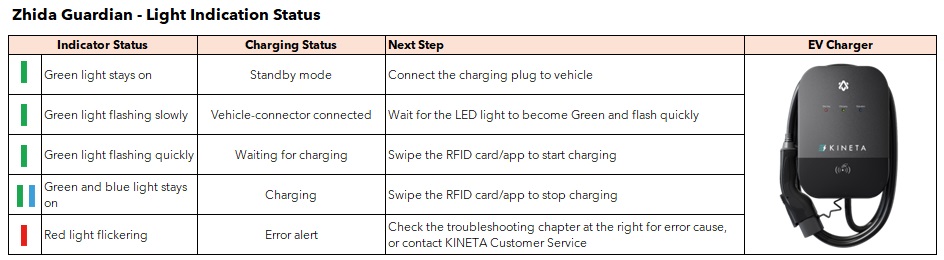
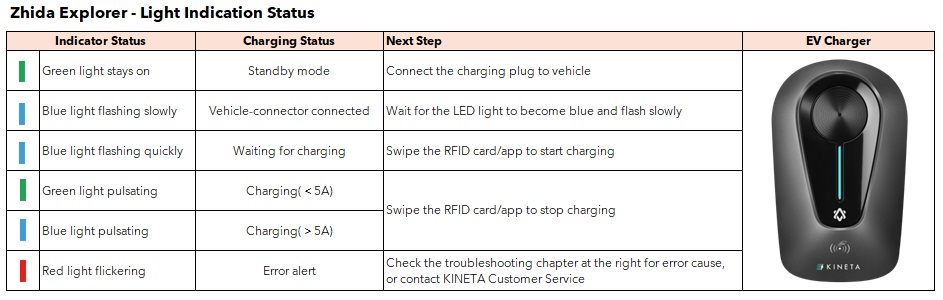
Steps 1 – Turn On the charger
Steps 2 – Wait for charger to turn into standby mode or after 90 seconds.
Steps 3 – Plug In charger gun to the car charging inlet.
Steps 4 – Should you require any further assistance, please contact KINETA.
Step 1 – Using remote or in car Unlock button, press to release charger gun from charging inlet.
Step 2 – In certain situation, it require a little push on the charger gun, to allow lock mechanism detach completely.
Step 3 – Carefully return charger gun and ensure cable is properly winded.
*Note: For some vehicles (ex: Zeekr), you’ll need to unlock it from the car’s head unit to release the charging nozzle.
Step 1 – Verify isolator position On or Off
Step 2 – Verify EV charger breakers inside power supply box. Position UP = Normal. Position DOWN = Power tripped
Step 3 – Position DOWN, please reset it to UP position.
Step 4 – Should you require any further assistance, please contact KINETA.
Step 1 – Hard reset the charger by turning Off the isolator.
Step 2 – Wait approximately 5 minutes to allow electricity discharge.
Step 3 – Turn On isolator, wait for charger to turn into standby mode.
Step 4 – Should you require any further assistance, please contact KINETA.
Step 1 – Verify is there a schedule charging was set either in car setting, or in mobile application setting.
Step 2 – Disable schedule charging.
Step 3 – Verify if the charger requires firmware update via charger mobile application, update charger firmware if required.
Step 4 – Contact KINETA if requires further assistance by providing photo and video of the issue.
Step 1 – Ensure follow correct steps before start charging.
Step 2 – Observes if the any sign of debris at charger gun pin and car charging inlet.
Step 3 – Turn Off the charger if required for charger gun’s clean up.
Step 4 – Contact KINETA if requires further assistance by providing photo and video of the issue.
Step 1 – Re bind the charger with charger’s mobile application.
Step 2 – Ensure charger has internet connectivity.
Step 3 – Allow synchronizing process, it may take a while depending on the size of history data.
Step 4 – Contact KINETA if requires further assistance by providing photo and video of the issue.
Step 1 – Please allow 10% power loss to the car from stated output power.
Step 2 – Charger will automatically reduce charging output if;
Step 3 – Contact KINETA if requires further assistance by providing photo and video of the issue.
Step 1 – Charger output power can be modified either via car setting (certain models only) and charger mobile application.
Step 2 – Please consider the maximum available capacity house before proceeding with modification. Over charging power can cause power tripped or damage on the electrical system.
Step 3 – Contact KINETA if requires further assistance by providing photo and video of the issue.
Step 1 – Unlike other electrical appliances, EV chargers require firmware updates to ensure continuous compatibility with the car.
Step 2 – Some firmware updates is not mandatory if charger is functioning well.
Step 3 – Ensure charger has internet connectivity.
Step 4 – Follow steps in the charger mobile application to proceed with firmware update.
Step 5 – Contact KINETA if requires further assistance by providing photo and video of the issue.
Step 1 – Unplug charger gun from charging inlet.
Step 2 – Switch Off charger supply.
Step 3 – With caution, observe at TNB meter if there is a sign of burnt. Call TNB Hotline to check on their wiring facility.
Step 4 – With caution, observe at house main supply box and charger sub supply box if there is a sign of burnt or melted. Call certified electrician to verify damaged circuit.
Step 5 – Contact KINETA if requires further assistance by providing photo and video of the issue.
Step 1 – Charger only can connect with 2.4Ghz WiFi signal, unless stated otherwise.
Step 2 – Ensure home WiFi signal detectable with good recipient at charger location.
Step 3 – Try to connect with mobile personal hotspot.
Step 4 – Some chargers require simple WiFi password to get through. Try to simplify it.
Step 5 – Contact KINETA if requires further assistance by providing photo and video of the issue.
Step 1 – Ensure charger is turned On
Step 2 – Try to apply normal Bluetooth Device search and observe is the charger Serial Number is listed.
Step 3 – Delisted charger Serial Number from phone Bluetooth Device list.
Step 4 – Try with another mobile phone.
Step 5 – Contact KINETA if requires further assistance by providing photo and video of the issue.
A wallbox is an additional charging unit that provides power at a higher rate than a standard three-pin plug socket.
A standard wall plug has an output of 2.3kW compared to a wallbox that has an output of 7.4kW, 11kW or 22kW.
The actual charge time will depend on the speed of the charger, the battery size and the electrical architecture of the EVs battery. However, to get a rough idea, the charging time can be calculated as follows:
For example:


Tethered cables are cables which are permanently attached to your charging station whereas untethered cables are those that are detachable from the charging unit. Some AC charging stations in Malaysia are un-tethered (does not have a cable attached to the charger) and you would therefore need to use a detachable cable to charge from these AC chargers.
Chargers that are rated IP54 or higher can be placed outdoors.
Our chargers come with a Type 2 (AC Charger) or CCS2 (DC Charger) tethered cable and will therefore be compatible to any EV models with a Type 2/CCS2. A Type 2 or CCS2 connector is as follows:
AC |  Mennekes (Type 2) |
DC |  CCS2 |
If you are purchasing a Sime Motors EV Charging package, please refer to your sales consultant.
Please refer to the product page for each AC Charger’s cable length
The length of the product warranty depends on the product purchased. Please refer to the product page for details.The warranty will start from the installation date of the product or the date of purchase (if only product is purchased).
KINETA covers any damage to the product except for any liability of direct or indirect damages due to:
We have two types of home installation package as follows:
| Single Phase home installation package | Three Phase home installation package |
EV DB Protection Devices:
| EV DB Protection Devices:
|
| 6mm² x 3 core PVC cable with PVC conduit surface within 10 meters from EVDB to AC charger | 6mm² x 5 core PVC cable with PVC conduit surface within 10 meters EVDB to AC charger |
| Testing & commissioning | |
The two protection devices included in the installation is as follows:
An Energy Meter can be used to measure electricity usage and can be included with an additional fee upon request. Please contact our customer service executive for further details.
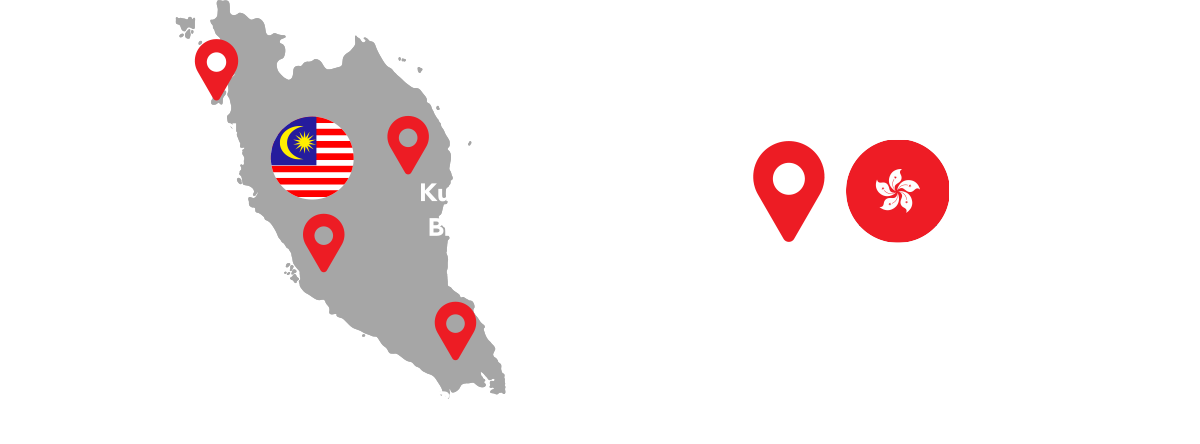
Yes, we do! While our headquarters is located at Sime Motors City in Ara Damansara, we also operate three other branches across Malaysia in Johor Bahru, Penang, and Kuantan allowing us to serve customers nationwide.
We provide a one-year warranty on all of our installations starting from the date of installation (Terms and Conditions applied).
KINETA will cover any damage to the product due to installation except for any liability of direct or indirect damages due to:
You will receive your invoice for the product and the installation after payment is completed. This will be handed to you in either hard or soft copy form depending on your preference.
You can pay via credit card at site or via bank transfer at the following details:
Beneficiary name: KINETA Sdn Bhd
Beneficiary address: 1, Jalan Puchong, Taman Perindustrian Puchong Utama, 47100 Puchong, Selangor Darul Ehsan
Bank name: Maybank Berhad
Bank Account No.: 014187309683
Email: account.kineta@sime.com
We will deliver the wallbox to you if you purchase it with the installation package.
If only the wallbox was purchased, we will post it to your location with additional postage fees, or you may pick up your Wallbox physically at our office M2 – 8 – 3A, Tower 2, Sime Darby Motors City, No. 6, Jalan PJU 1A/7, Ara Damansara 47301 Petaling Jaya, Selangor. Please contact our customer service executive (+603-7622 9999) to arrange the pick up.
If the wallbox has been purchased and installed, there will be no refunds.
If there is a problem with the product or installation, please contact our customer service help line and we will troubleshoot the issue for you.
Please contact our general line at +603-7622 9999. Our troubleshooting team will diagnose the issue remotely and provide on-site support to restore services where required.
No, there will be no additional charge for wallbox and installations that are still within the warranty period.
Yes, Borang G and Borang H will be provided upon request.
Will my wallbox be delivered to me?
We will deliver the wallbox to you if you purchase it with the installation package.
If only the wallbox was purchased, we will post it to your location with additional postage fees, or you may pick up your Wallbox physically at our office M2 – 8 – 3A, Tower 2, Sime Darby Motors City, 6, Jalan PJU 1A/7, Ara Damansara, 47301 Petaling Jaya, Selangor.
KINETA SDN. BHD.
Company Registration No.: 5427-T
Service Tax Reg. No. B16-2103-32000037
M2 – 8 – 3A, Tower 2, Level 8, Sime Darby Motors City,
No. 6, Jalan PJU 1A/7, Ara Damansara 47301 Petaling Jaya, Selangor
Call us
+603-7622 9999 (GL)
Email us at
kineta@sime.com
Operation Hour
Monday to Friday: 0830 – 1730
Saturday & Sunday & PH: Closed